Metro-Tec

Built for the people who run pools, fields, and courts.

metro-tec schedule replaces spreadsheets and email threads with one platform for allocations, automated communication, and finance-ready records.

Flexible Scheduling and Dynamic Allocation

Give your staff one shared operating view for recurring bookings, special events, and policy-driven exceptions.

  • Allocate down to the sub-resource (lane, section, or surface) with attributes you define for your facility
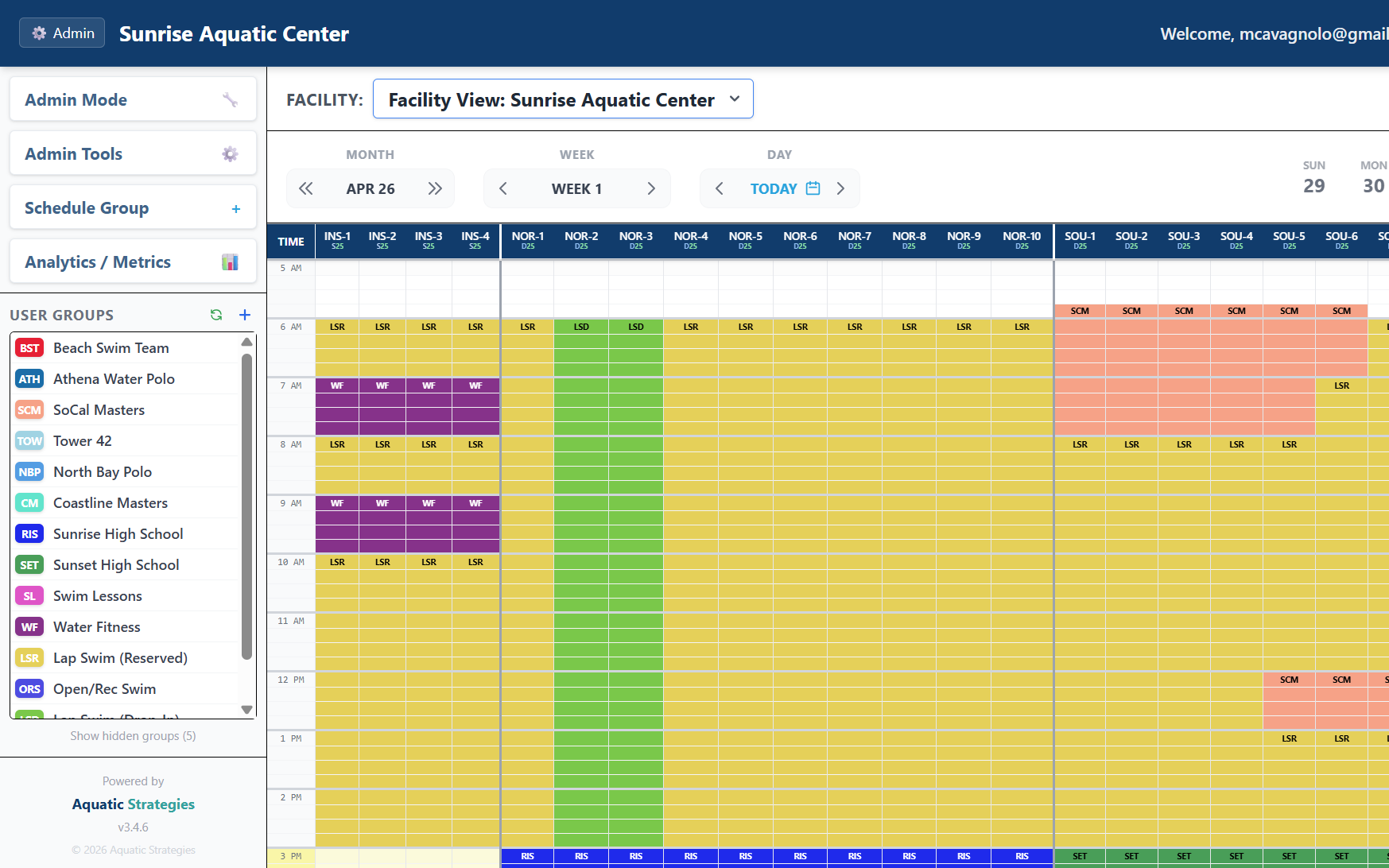
  • Schedule a season of recurring blocks and a one-off tournament exception in the same view
  • See every pool, field, and court your team operates side by side - no more switching between spreadsheet tabs
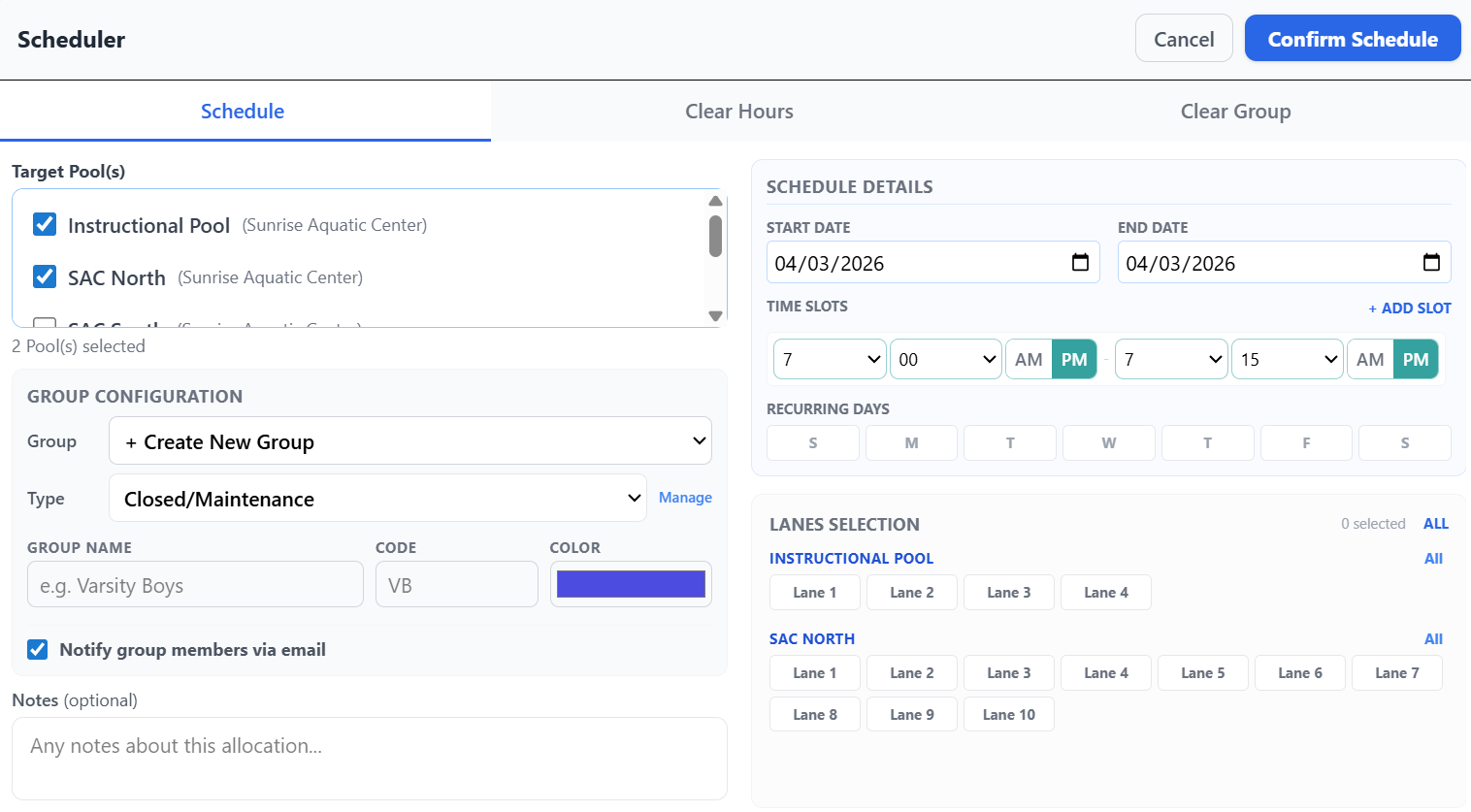
  • Real-time conflict detection - see and resolve overlaps the moment they happen
Allocation Scheduling Dashboard
Scheduling Modal Overlay

Rules, Billing, and Performance Metrics

Establish policy-aligned booking behavior while simplifying invoicing and monthly reporting for finance and operations teams.

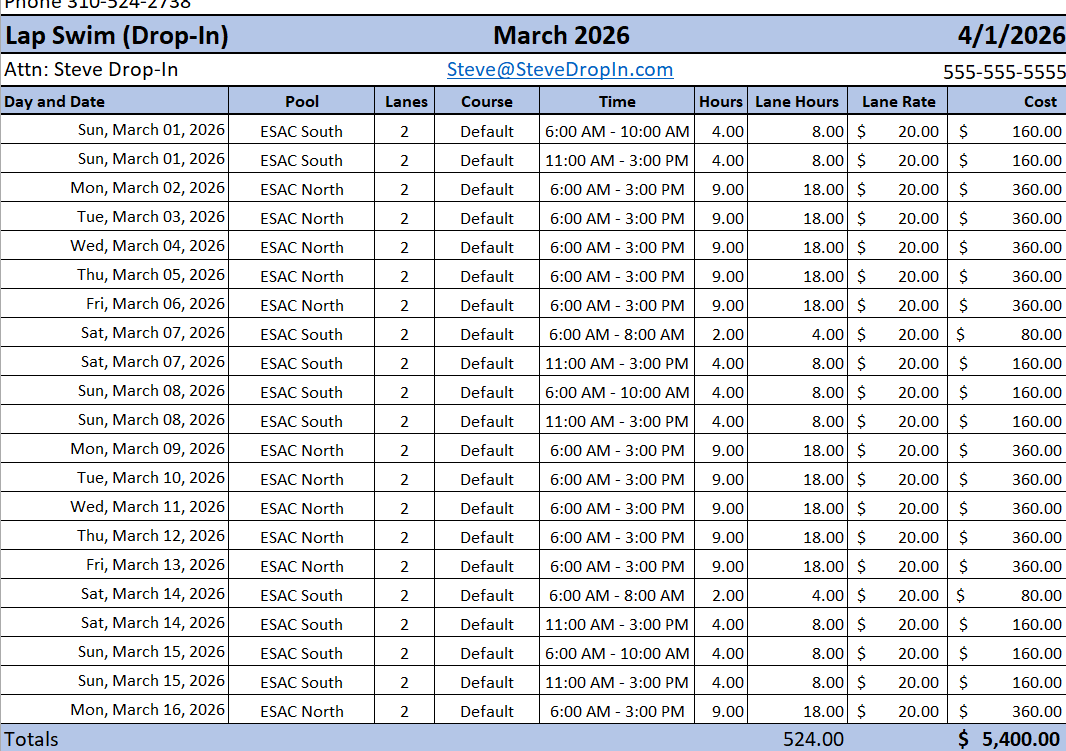
  • Automated, pre-filled invoice generation from booked hours
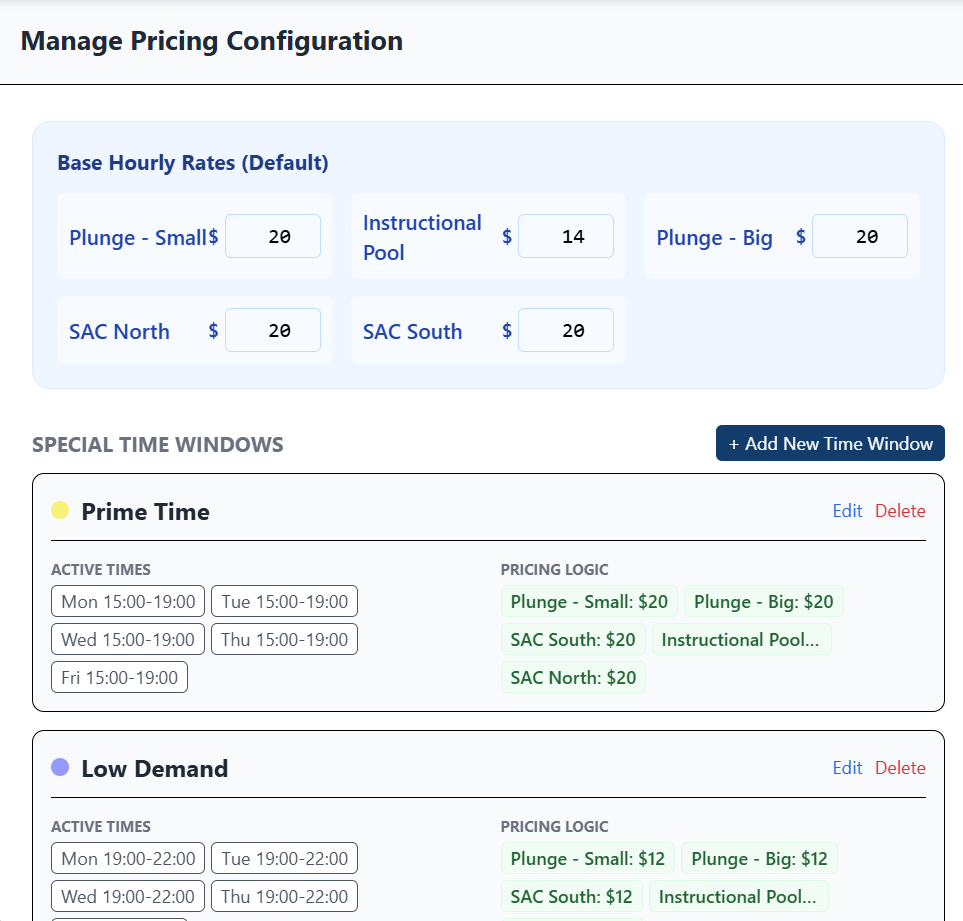
  • Custom rate tiering by group, by facility, and by time of day
  • Detailed row-level CSV exports and reporting views built for finance handoff
  • Forecast committed revenue from your existing booking schedule
Pricing Tiers
Exportable Invoices

Transparency, Communication, and Control

Keep administrators, stakeholders, and permit holders aligned with transparent schedule data and accountable booking history.

  • Post your facility schedule publicly on your city's website - branded, read-only, no login required
  • Affiliated groups see what's open and request time directly; admins approve from a queue
  • Automated change notifications go to the affected groups - not the whole department
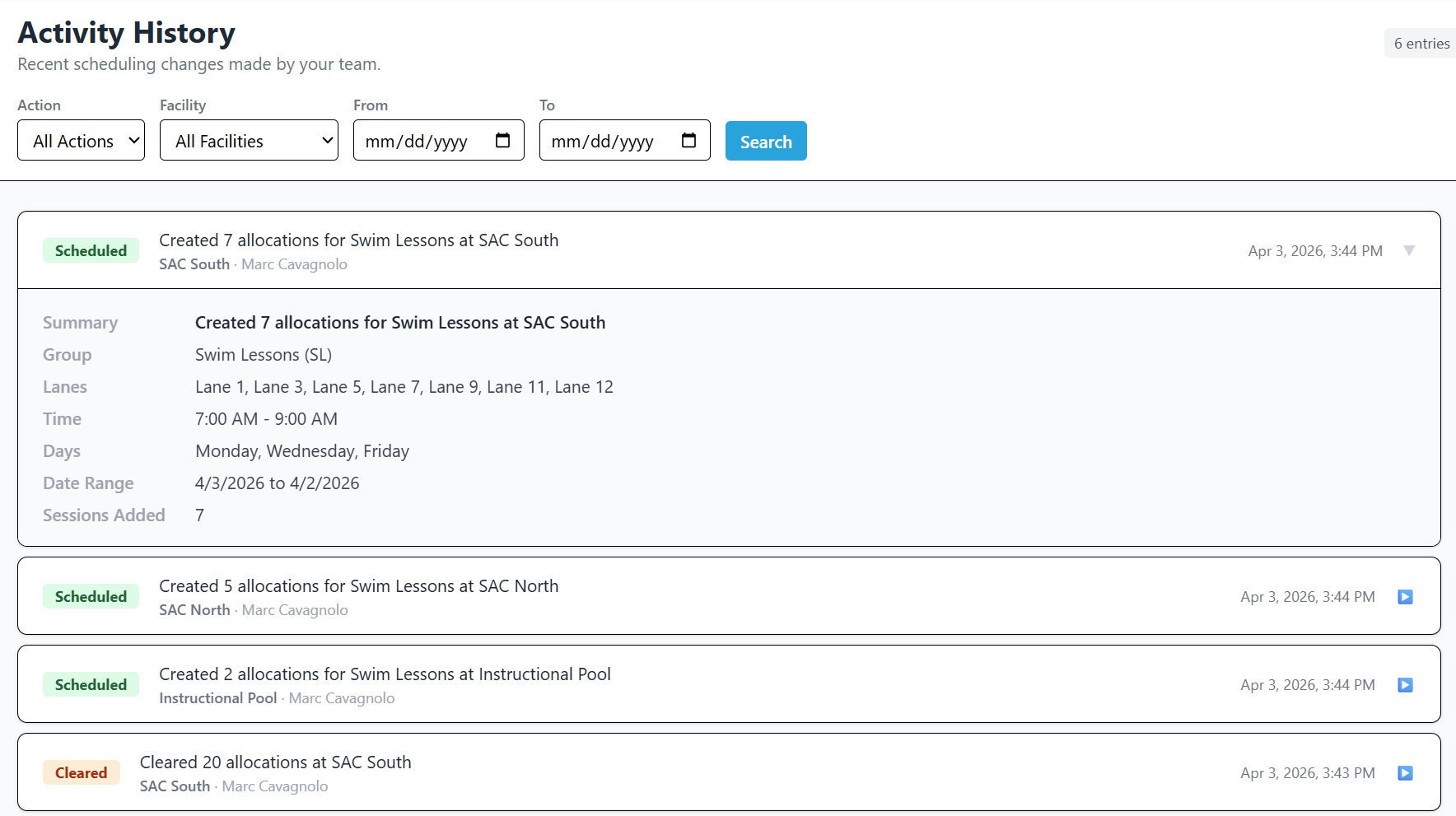
  • Powerful audit logging, resilient data management, and a complete history of every booking change
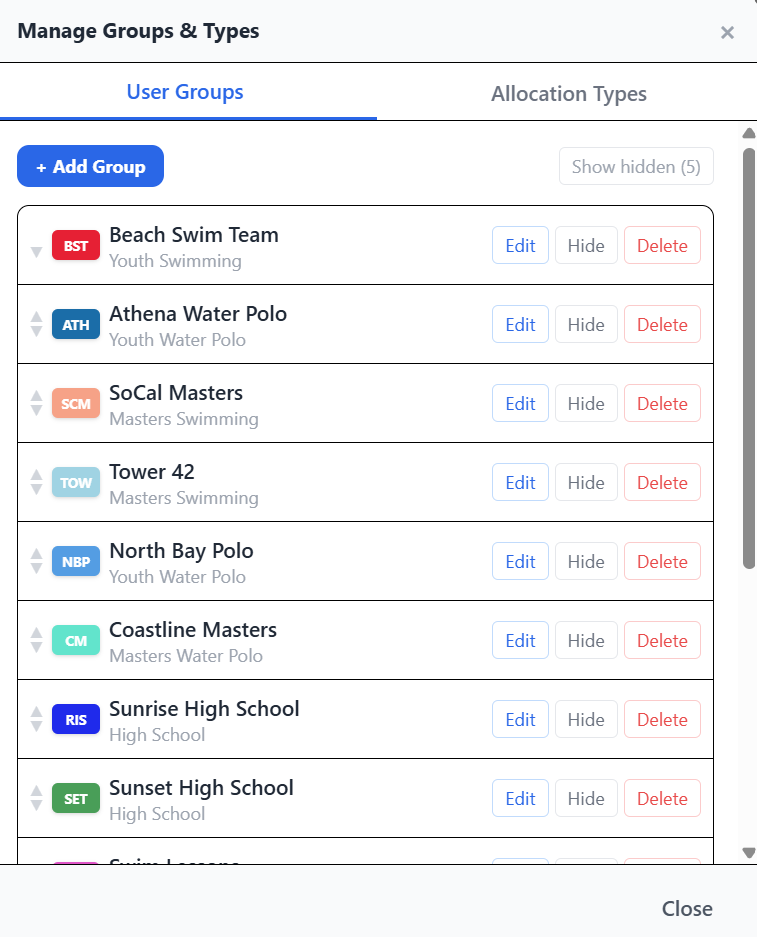
Group Management Dashboard
Audit Logs

Platform capabilities for high-demand public operations

Beyond booking calendars, metro-tec schedule supports the policy and financial complexity that comes with managed public facilities.

Roles and access controls

Configure view-only access for affiliated user groups, admin permissions scoped by facility, and per-group notification subscriptions so the right people see the right schedule changes.

Conflict detection and override workflow

Every override is logged with the displaced groups, time slots, and admin notes - visible in the audit log and surfaced as notifications to affected groups.

Finance-ready outputs

Generate billing-ready records, utilization metrics, and revenue forecasts that support transparent reconciliation across departments.

Most cities are up and running in days to weeks, not months. Self-service trial available - no procurement cycle required to evaluate.

Choose the tier that fits your operation

Tier 1

Up to 10 user groups across one facility

Best for: A single aquatic center or recreation facility moving off spreadsheets

$99 / month

See tier details

Tier 2

Up to 30 user groups across as many as three facilities

Best for: Parks and recreation departments managing multiple facilities or resource types

$169 / month

See tier details

Tier 3

Up to 60 user groups across as many as ten facilities, unlimited admin users and allocations

Best for: Multi-site operations with complex policy, billing, and reporting requirements

$249 / month

See tier details

Common questions

What kinds of facilities does metro-tec schedule support?
Aquatic centers and pools, sports fields and courts, recreation and community centers, multi-use civic facilities, and school or district shared-use spaces. The platform adapts terminology and scheduling granularity (lanes for pools, sub-units for fields/courts) to match each facility type.
How does scheduling handle different resource types in one system?
Each instance is configured for a primary resource type - pools, fields, courts, or general - and individual resources within an instance can have their own type-specific configuration (lane attributes, surface types, sub-units). Schedules respect the granularity of each resource: a pool might be allocated by lane, a field by sub-section, a court as a whole.
Can users see their own bookings and forecast their spend?
Yes. Users with portal access can view their group's current and historical schedule, see actual and forecast spend based on existing bookings, and receive automated notifications when their group's schedule changes.
How are notifications handled?
Both email and in-app. Email notifications fire when allocations are created, modified, cleared, or displaced. Each user can be subscribed to specific groups. Notification defaults can be configured per group so admins control when emails go out by default.
Can residents view our facility schedule without logging in?
Yes. Admins can opt into a public no-login schedule view at a stable URL, branded with your facility's logo and color theme. The view is read-only and shows availability without exposing pricing, contact information, or group member details.
Can affiliated groups (coaches, league administrators) request time on their own?
Yes. Signed-in group users see an Availability Report showing open blocks across all the resources they're permitted to see, with a "Request" button on each. Requests go into an admin approval queue; approvals re-check for conflicts before committing.
What happens when allocations conflict?
The platform detects conflicts at the moment of scheduling and offers an override path that displaces existing allocations transparently. Every override is logged with the displaced groups, time slots, and admin notes - visible in the audit log and notified to affected groups.
How is data backed up?
Automated backups to Google Cloud Storage run on a regular schedule. Admins can also trigger manual backups on demand and restore from any prior backup. CSV and JSON snapshot exports are available at any time from the admin panel.
Is the platform mobile-friendly?
Yes. The platform is a Progressive Web App - installable on iOS, Android, and desktop. Mobile views are optimized for both portrait and landscape orientations and are designed for staff use in the field.

Ready to simplify your facility management?

Replace spreadsheet-driven operations with a system designed for public-facility complexity.